
Most confusion in Field Service projects comes from mixing up a few core objects. Once the data model clicks, design decisions, reports and migrations all become easier. Here is how I explain it to teams new to Field Service.
The work
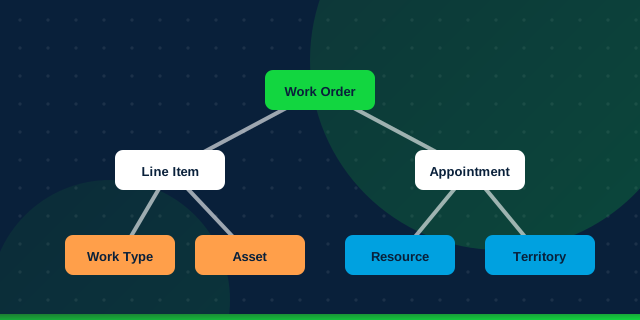
- Work Order: the job to be done, such as "repair pump at site 12". It holds the account, asset, location and overall status.
- Work Order Line Item: individual tasks within a work order, each with its own status and work type.
- Work Type: a template for a kind of job. It sets estimated duration, required skills and parts, and whether a Service Appointment is created automatically.
The scheduling
- Service Appointment: a visit scheduled at a time. Its
ParentRecordIdusually points to a Work Order or Line Item. One work order can need several visits. - Assigned Resource: the junction that says which Service Resource is doing which appointment.
The people and places
- Service Resource: a technician (linked to a user), a crew, or a piece of equipment that can be scheduled.
- Service Territory: a region or team, with its Operating Hours.
- Service Territory Member: connects a resource to a territory as primary, secondary or relocation, with effective dates.
- Skills, Service Resource Skills and Skill Requirements: what a technician can do and what a job needs.
- Resource Absence: time a resource is unavailable.
The things
- Asset: installed equipment at a customer site, with its service history.
- Location, Product Item, Product Required and Product Consumed: the inventory model.
How it fits together
A Work Type shapes a Work Order. The Work Order gets one or more Service Appointments. Scheduling uses Territories, Operating Hours, Skills and Absences to pick a Service Resource, recorded as an Assigned Resource. On site, the technician records Products Consumed and completes the appointment.
Design rule I follow: keep business data about the job on the Work Order, and keep time-and-place data on the Service Appointment. Mixing the two causes duplicate fields and confusing reports.